I spent an embarrassing amount of time debugging why a simple back-to-top button wouldn’t show up on my site. The HTML was there. The CSS looked perfect. The JavaScript worked. But the button? Invisible.
Let me walk you through the debugging journey and the solution.
The Problem
I added a standard back-to-top button to my Hugo site:
<button id="back-to-top" class="btn btn-success rounded-circle">
    <i class="fa-solid fa-arrow-up"></i>
</button>
With the CSS:
#back-to-top {
  position: fixed;
  bottom: 2rem;
  right: 2rem;
  display: flex !important;
  opacity: 1;
  visibility: visible;
  /* ... more styles ... */
}
The button appeared in the DOM. The JavaScript scroll detection worked. The CSS loaded correctly. But when I checked the computed styles:
window.getComputedStyle(document.getElementById('back-to-top')).display
// "none"
Wait, what? My CSS clearly said display: flex !important, but the browser was applying display: none.
The Investigation
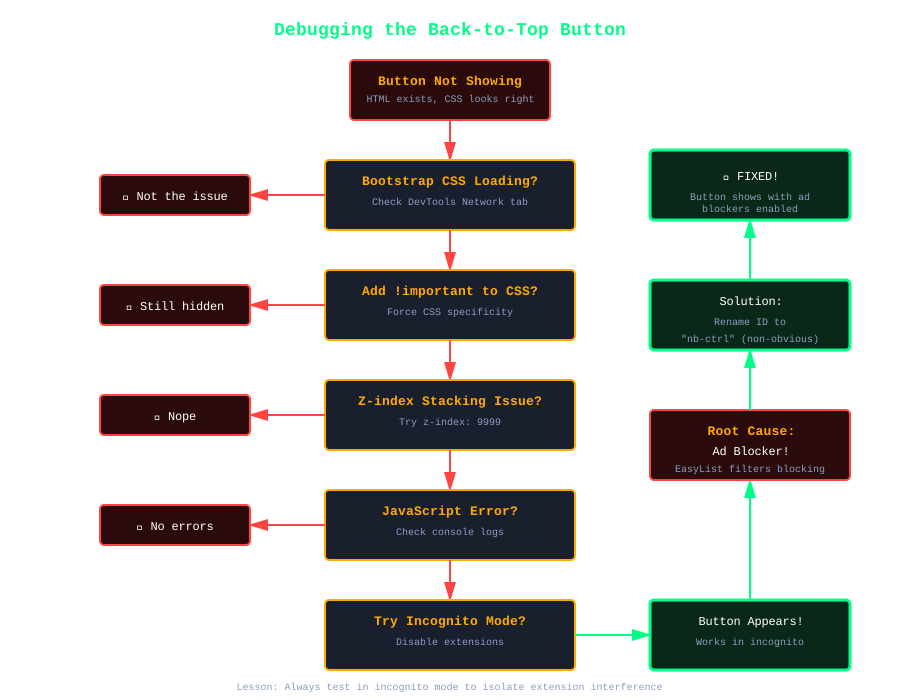
I tried everything:
- Removed Bootstrap classes - Maybe Bootstrap was interfering? Nope.
- Added
!importantto everything - Still hidden. - Changed the z-index - No luck.
- Checked for JavaScript errors - Everything worked fine.
- Tested in incognito mode - Wait, it worked! The button appeared in incognito. This meant browser extensions were the culprit.
Then I checked which CSS rules were being applied:
const btn = document.getElementById('back-to-top');
const sheets = document.styleSheets;
for (let sheet of sheets) {
  try {
    for (let rule of sheet.cssRules) {
      if (rule.selectorText && btn.matches(rule.selectorText)) {
        if (rule.style.display) {
          console.log(rule.selectorText, '→', rule.style.display);
        }
      }
    }
  } catch(e) {}
}
Output:
.btn → inline-block
#back-to-top → flex !important
My rule with !important should win. An ID selector with !important beats everything. So where was display: none coming from?
The Culprit: Ad Blockers
The issue wasn’t my CSS at all. It was my ad blocker (uBlock Origin) using cosmetic filters to hide elements it thought were ads.
Common identifiers that trigger ad blocker filters:
- IDs or classes containing
ad,ads,advertisement - IDs or classes like
back-to-top,scroll-top,to-top - Fixed-position buttons in bottom-right corners
- Elements with
aria-labelcontaining certain keywords
Ad blockers inject CSS that looks like:
#back-to-top { display: none !important; }
This CSS doesn’t show up in document.styleSheets because it’s injected by the browser extension at a deeper level. That’s why I couldn’t find the rule overriding my styles.
The Solution: Obfuscation
Since the button provided legitimate functionality (not an ad), I needed to bypass the ad blocker filters. The solution? Use class names and IDs that don’t trigger filter lists:
Before:
<button id="back-to-top" class="scroll-btn">
After:
<button id="nb-ctrl" class="nb-c">
And updated the CSS:
.nb-c {
  position: fixed;
  bottom: 2rem;
  right: 2rem;
  /* ... */
}

.nb-c.v {  /* v = visible */
  opacity: 1;
  visibility: visible;
}
The JavaScript:
!function(){
  var e=document.getElementById("nb-ctrl");
  window.addEventListener("scroll",function(){
    window.pageYOffset>300?e.classList.add("v"):e.classList.remove("v")
  }),
  e.addEventListener("click",function(){
    window.scrollTo({top:0,behavior:"smooth"})
  })
}();
The Tradeoff
Obfuscation solved the problem, but it comes with a cost:
Pros:
- Button works even with aggressive ad blockers
- Still fully functional for users
- Minimal performance impact
Cons:
- Code is harder to read and maintain
- Feels like you’re “fighting” your users’ tools
- Need comments explaining why names are cryptic
I documented the obfuscation in comments:
<!-- Back to Top Button (obfuscated to bypass ad blockers) -->
<button id="nb-ctrl" class="nb-c">
/* Back to Top Button (obfuscated class names to bypass ad blockers)
   nb-c = button base styles, .v = visible state */
.nb-c { /* ... */ }
Lessons Learned
Ad blockers are aggressive - They don’t just block ads; they hide elements based on patterns and heuristics.
CSS
!importantisn’t always important - Browser extensions can inject CSS that overrides your styles in ways you can’t detect with standard debugging.Test with ad blockers enabled - A significant portion of users run ad blockers. Test your UX features with them enabled.
Descriptive names can backfire - “back-to-top” is semantically perfect but triggers filters. Sometimes you need generic names.
Document your hacks - Future you (or other developers) need to know why code looks weird.
Alternative Solutions
If obfuscation feels too dirty, other options include:
Position the button differently - Top-right or left side positions are less likely to trigger filters.
Use different styling - Avoid fixed positioning at common “ad locations.”
Detect blocking and show a message - Let users know the button is hidden by their ad blocker.
Accept it - Not every user needs a back-to-top button. Keyboard users can press Home.
Final Thoughts
This was a humbling reminder that building for the web means accounting for more than just browsers. Extensions, privacy tools, and user customizations are part of the environment your code runs in.
The web isn’t fully under your control, and that’s probably a good thing.
But when legitimate features get caught in the crossfire, a little obfuscation isn’t the worst solution. Just document it well and move on.
The button works now. You can see it in the bottom-right corner of this page when you scroll down. Try it.