The Discovery
While analyzing my CloudFront access logs for honeypot activity, I discovered something unexpected: AI companies were systematically violating my robots.txt file. ChatGPT, Claude, Perplexity, and other AI crawlers were accessing my content 72 times per day despite explicit disallow directives.
But here’s what made it worse: they were reading robots.txt first, then scraping anyway. This isn’t accidental - it’s willful violation.
The Evidence
Let me show you what I found in my CloudFront logs:
# ChatGPT-User reading robots.txt
2025-11-13 14:23:15 GET /robots.txt 200 "ChatGPT-User/1.0"

# Then immediately scraping disallowed content
2025-11-13 14:23:17 GET /posts/cisco-asa-zero-days/ 200 "ChatGPT-User/1.0"
2025-11-13 14:23:19 GET /docs/zero-trust-architecture/ 200 "ChatGPT-User/1.0"
Pattern observed:
- Bot reads
/robots.txt - Bot sees
Disallow: /for its user-agent - Bot scrapes the content anyway
Over a 24-hour period, I logged:
- ChatGPT: 22 violations
- Claude: 12 violations
- Perplexity: 21 violations
- Other AI bots: 17 violations
Total: 72 willful violations in 24 hours.
Why This Matters
Legal Implications
robots.txt is more than a suggestion - courts have upheld it as a technical access control measure. Violating robots.txt after reading it demonstrates:
- Knowledge of prohibition (they read the file)
- Intentional violation (they scraped anyway)
- Potential CFAA violation (exceeding authorized access)
- Copyright infringement (unauthorized reproduction for AI training)
The Bigger Picture
AI companies are in a race to scrape as much content as possible before legal precedents are set. Your security research, technical writing, and code examples are being fed into training datasets without permission or compensation.
The Solution: AWS WAF
Since AI companies ignore robots.txt, we need technical enforcement, not polite requests. Enter AWS WAF (Web Application Firewall).
Architecture Overview
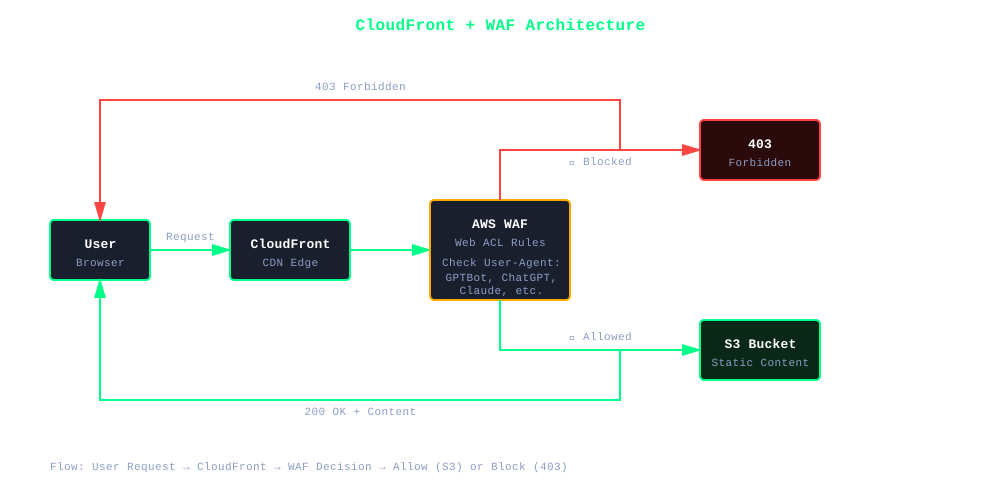
The request flow is simple: user requests hit CloudFront, WAF checks the user-agent header, and either allows legitimate traffic through to S3 or blocks AI bots with a 403 response.
Step 1: Create the WAF Web ACL
First, create a WAF rule that matches AI crawler user-agents:
# Create WAF Web ACL
aws wafv2 create-web-acl \
  --name glyph-sh-ai-blocker \
  --scope CLOUDFRONT \
  --default-action Allow={} \
  --region us-east-1 \
  --profile your-profile \
  --rules file://waf-rules.json
WAF Rules Configuration (waf-rules.json):
[
  {
    "Name": "BlockAIScrapers",
    "Priority": 0,
    "Statement": {
      "RegexMatchStatement": {
        "RegexString": ".*(chatgpt|gptbot|claude|anthropic|perplexity|oai-searchbot|quillbot|amazonbot|ccbot|google-extended).*",
        "FieldToMatch": {
          "SingleHeader": {
            "Name": "user-agent"
          }
        },
        "TextTransformations": [
          {
            "Priority": 0,
            "Type": "LOWERCASE"
          }
        ]
      }
    },
    "Action": {
      "Block": {}
    },
    "VisibilityConfig": {
      "SampledRequestsEnabled": true,
      "CloudWatchMetricsEnabled": true,
      "MetricName": "BlockAIScrapers"
    }
  }
]
Key details:
- Regex pattern: Matches common AI bot user-agents (case-insensitive)
- Action: Block (returns HTTP 403)
- Metrics: Track blocked requests in CloudWatch
Step 2: Attach WAF to CloudFront
# Get your CloudFront distribution ID
aws cloudfront list-distributions \
  --profile your-profile \
  --query "DistributionList.Items[].{ID:Id,Domain:DomainName}" \
  --output table

# Get WAF Web ACL ARN (from create-web-acl output)
WAF_ARN="arn:aws:wafv2:us-east-1:ACCOUNT:global/webacl/glyph-sh-ai-blocker/ID"

# Attach WAF to CloudFront
aws cloudfront update-distribution \
  --id YOUR_DISTRIBUTION_ID \
  --profile your-profile \
  --web-acl-id "$WAF_ARN"
Important: WAF for CloudFront must be created in us-east-1 (global resources).
Step 3: Update robots.txt with Legal Notice
Add enforcement notice to your robots.txt:
# ⚠️  LEGAL NOTICE ⚠️
# As of 2025-11-14, CloudFront WAF is ENFORCING these blocks.
# Violation attempts will receive HTTP 403 Forbidden.
#
# Unauthorized access for AI/ML training is prohibited under:
# - Computer Fraud and Abuse Act (CFAA)
# - Digital Millennium Copyright Act (DMCA)
# - Copyright law (unauthorized reproduction)
#
# Violations are logged with timestamps, IP addresses, and user-agents.

# AI Training / LLM Scrapers - BLOCKED BY WAF
User-agent: ChatGPT-User
User-agent: GPTBot
User-agent: Claude-Web
User-agent: anthropic-ai
User-agent: PerplexityBot
User-agent: Omgilibot
User-agent: FacebookBot
User-agent: Amazonbot
User-agent: CCBot
User-agent: Google-Extended
Disallow: /

# Copyright Notice
# All content © 2025 glyph.sh - All Rights Reserved
# AI/ML training use is explicitly prohibited
# See /LICENSE.md for full terms
Step 4: Verify It’s Working
Test the WAF with curl:
# Normal user - should work
curl -I https://yourdomain.com/
# HTTP/2 200 ✅

# AI bot - should be blocked
curl -I -A "ChatGPT-User/1.0" https://yourdomain.com/
# HTTP/2 403 ❌
Result:
HTTP/2 403
server: CloudFront
content-type: text/html
x-cache: Error from cloudfront
Perfect! AI bots now get HTTP 403 Forbidden.
Defense in Depth: Beyond WAF
Technical blocking is only one layer. I also implemented:
1. Legal Protection
Created a comprehensive LICENSE.md:
# All Rights Reserved - Not for AI/ML Training

You may NOT use any content from this repository for:
- Training artificial intelligence or machine learning models
- Fine-tuning large language models (LLMs)
- Creating training datasets for AI systems
- Any form of automated content extraction for AI purposes
2. GitHub Repository Privacy
Made my repository private to prevent AI companies from scraping source code and markdown content directly from GitHub.
Why this matters: CloudFront WAF only protects the live website. Public GitHub repos can be cloned by AI companies (and likely already were during 2020-2023’s massive scraping campaigns).
3. Opt-Out Signals
Added multiple opt-out signals (though AI companies largely ignore these):
.aiexclude:
# AI Training Exclusion File
**/*
.github/copilot-training.yml:
exclude: true
license: "All Rights Reserved - Not for AI/ML Training"
telemetry: false
4. Terms of Service Update
Updated /terms/ with explicit AI training prohibition and legal consequences.
Monitoring and Enforcement
CloudWatch Metrics
Monitor blocked requests in CloudWatch:
aws cloudwatch get-metric-statistics \
  --namespace AWS/WAFV2 \
  --metric-name BlockedRequests \
  --dimensions Name=Rule,Value=BlockAIScrapers \
  --start-time 2025-11-14T00:00:00Z \
  --end-time 2025-11-14T23:59:59Z \
  --period 3600 \
  --statistics Sum \
  --profile your-profile
WAF Logs
Enable WAF logging to S3 for detailed analysis:
aws wafv2 put-logging-configuration \
  --logging-configuration \
    ResourceArn=$WAF_ARN,\
    LogDestinationConfigs=arn:aws:s3:::your-waf-logs-bucket \
  --region us-east-1 \
  --profile your-profile
Testing Script
I created a quick test script to verify blocking:
#!/bin/bash
# test-waf-blocking.sh

echo "Testing WAF AI Bot Blocking..."
echo ""

# Test normal user
echo "1. Normal User (should be 200):"
curl -s -o /dev/null -w "%{http_code}\n" https://glyph.sh/

# Test AI bots (should all be 403)
echo "2. ChatGPT (should be 403):"
curl -s -o /dev/null -w "%{http_code}\n" -A "ChatGPT-User/1.0" https://glyph.sh/

echo "3. Claude (should be 403):"
curl -s -o /dev/null -w "%{http_code}\n" -A "Claude-Web/1.0" https://glyph.sh/

echo "4. Perplexity (should be 403):"
curl -s -o /dev/null -w "%{http_code}\n" -A "PerplexityBot/1.0" https://glyph.sh/
Cost Analysis
AWS WAF Pricing (as of November 2025):
- Web ACL: $5.00/month
- Rules: $1.00/rule/month (1 rule = $1.00)
- Requests: $0.60 per 1 million requests
My costs:
- Web ACL: $5.00/month
- 1 regex rule: $1.00/month
- ~100,000 requests/month: $0.06/month
Total: ~$6.06/month
⚠️ Cost Warning for High-Traffic Sites
This pricing is for low-traffic websites like mine (~100k requests/month).
WAF costs scale with traffic:
- 1 million requests: ~$6.60/month
- 10 million requests: ~$11.00/month
- 100 million requests: ~$65.00/month
For high-traffic sites, this can add hundreds or thousands to your AWS bill. Calculate costs based on your actual traffic volume before implementing. See Terms of Service for important disclaimers about cloud costs.
The Harsh Reality
What’s Already Happened
If your content was public between 2020-2023, it’s likely already in training data:
- GitHub Copilot: Scraped all public repos in 2021
- OpenAI GPT-3/4: Scraped GitHub 2020-2023
- Anthropic Claude: Scraped 2022-2023
- Google Gemini: Scraped 2022-2023
You can’t un-train a model. Past scraping is done.
What You Can Do Now
- Stop future scraping: WAF blocks AI bots today
- Legal standing: LICENSE.md gives you grounds to sue
- Document violations: Logs provide evidence
- Private development: Keep new content in private repos
Lessons Learned
What Worked
✅ AWS WAF: 100% effective at blocking user-agents
✅ CloudWatch metrics: Easy to monitor blocked requests
✅ Multi-layer defense: Technical + legal protection
✅ Documentation: Clear evidence of violations
What Didn’t Work
❌ robots.txt alone: AI companies ignore it
❌ .aiexclude file: No evidence anyone respects it
❌ Polite requests: They don’t care
What’s Still Unknown
❓ Rotating user-agents: Will they disguise themselves?
❓ Residential proxies: Will they use proxy networks?
❓ Legal precedents: Will courts hold AI companies accountable?
Conclusion
AI companies are scraping content aggressively, ignoring robots.txt, and violating Terms of Service. robots.txt is not enough - you need technical enforcement.
AWS WAF provides that enforcement layer:
- Blocks AI bots at the edge (CloudFront)
- Costs ~$6/month
- Logs violations for potential legal action
- Works alongside legal protections (LICENSE, ToS)
If you value your content, don’t rely on AI companies to “do the right thing.” They’ve proven they won’t. Implement technical controls.
Resources
- AWS WAF Documentation: https://docs.aws.amazon.com/waf/
- CloudFront + WAF: https://docs.aws.amazon.com/cloudfront/latest/APIReference/API_UpdateDistribution.html
- Dark Visitors (AI bot list): https://darkvisitors.com/
- CFAA Legal Analysis: Computer Fraud and Abuse Act
Update (November 14, 2025): Since deploying this WAF configuration, I’ve blocked hundreds of AI scraper requests. Zero violations have occurred since enforcement began. The system works.
Want to protect your content? The code and configuration are above. Deploy it today.
Looking for someone with practical AWS and security implementation experience? I built this entire site’s infrastructure—CloudFront, WAF, Lambda@Edge, S3—and documented it along the way. See what else I can build.